
Compare and Synchronize Database Schemas
- Compare and synchronize database schemas
- Generate synchronization scripts
- Visualize the differences between database schemas
- Intelligent mapping of (renamed) database objects
- Includes a command-line utility
Datanamic SchemaDiff is a tool for comparison and synchronization of database schemas. It allows you to compare and synchronize tables, views, functions, sequences (generators), stored procedures, triggers and constraints between two databases. Multiple databases are supported. You can compare and synchronize Oracle, MySQL, MS Access, MS SQL Server, InterBase, SQLite, Firebird and PostgreSQL database schemas.
For comparing and synchronizing database contents, check out Datanamic SchemaDiff's companion product, Datanamic DataDiff.
The Full Picture
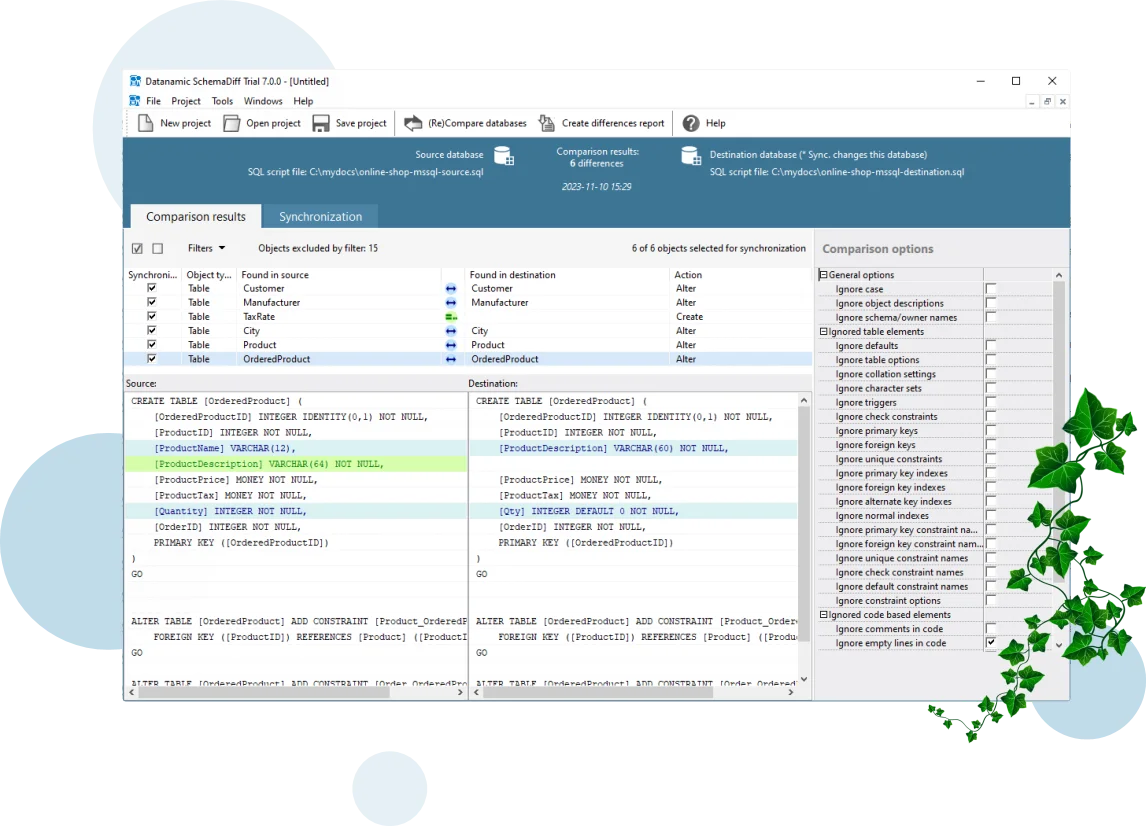
Datanamic SchemaDiff will give you the full picture of all database differences. Once your databases are compared, you can view the differences and generate the necessary (database specific) synchronization script to update the destination database and make it identical to the source database.
Intelligent Alteration Code
The tool uses native connections to Oracle, MS SQL Server, MySQL, MS Access, Interbase, Firebird, SQLite and PostgreSQL. For each supported database, database specific comparison routines are used. For the synchronization, database specific synchronization scripts/routines are generated.
Features
Schema Comparison
- Database schema to database schema comparison.
Connect to two databases and compare the objects in those databases. - SQL script to database schema comparison.
Connect to a databases and select a SQL script representing a database and compare the objects in both sources. - Schema mapping.
Mapping schemas enables you to compare database objects that belong to the same or different schemas. - Intelligent object mapping.
Mapping is used to connect the objects to be compared. Mapping of database objects in source and destination database is done based on names. If no object with the same name was found, intelligent routines are used to find out if an object must be mapped to an object with another name. It detects renamed database objects. - Compare all database object types. Compare tables, procedures, indexes, views, triggers, constraints etc.
- Generate HTML reports with database differences.
- Fine-tune the comparison with the comparison options.
You can control what is compared and what is seen as a difference. Use the comparison options such as case insensitivity, ignore constraints and 30 other options, for that.
Schema Synchronization
- Synchronize complete database or selected objects.
You can select the database objects you want to synchronize. - Intelligent alter script generation.
Generated synchronization script handles object dependencies. - Fine-tune the synchronization process with synchronization options.
You can ignore table elements or objects descriptions, ... for synchronization.

Presentation Of Differences
- Visual representation of differences.
A side-by-side, colour-coded comparison overview makes it easy to pinpoint at a glance similarities and differences between two database objects. - Summary of differences between two databases.
The summary includes objects in source but not in destination (or vice versa), identical objects and the totals of selected objects. You can easily copy the summary to the clipboard. - Object type filtering.
Filtering the comparison results enable you to limit the display of objects to certain types of database objects (for example, show only tables and/or views). - Status filtering.
Filter the comparison results based on the status (identical, different, etc...) of the compared object.
Automation
- Automated object comparison and synchronization.
A command-line utility is included to automate your compare and synchronize process. - Project-oriented.
Save your comparison plan to a SchemaDiff project.

Database Connectivity
- Support for multiple databases.
Databases supported:- Oracle 8, 9, 10, 11, 12, 18, 19, 21c and 23c.
- MySQL 4, 5, 6 and 8.
- PostgreSQL 7, 8, 9, 10, 11, 12, 13, 14, 15 and 16.
- MS SQL Server 2000, 2005, 2008, 2012, 2014, 2016, 2017, 2019 and 2022.
- MS Access 2000, 2003, 2007, 2010 and 2013.
- Microsoft SQL Azure.
- Firebird 1.x, 2.x and 3.x.
- InterBase 6, 7, 2009 and XE.
- SQLite 3.0 and higher.
- Cross database versions comparison.
You can for example compare (and synchronize) a PostgreSQL 9 and a PostgreSQL 10 database. Note that cross database platform (e.g. Oracle - MS SQL) is not supported.
Try Datanamic SchemaDiff for free
Download a free trial, and start saving time with your database deployments today.