
Database-Independent Modeling
With DeZign for Databases you can create a data model for a specific DBMS or you can create a data model independent of the implementation of any particular DBMS. You can choose the DBMS you want to use at the time that you need to connect to your target database or when you want to forward engineer. Database independent modeling is particularly useful if you want to implement a data model on more than one DBMS.
Creating a Database-Independent Model
You can create a new, empty database independent data model document using the New project command on the File menu.
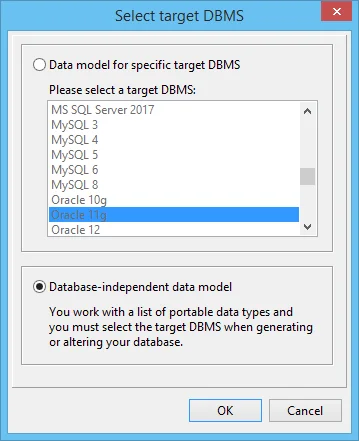
In the New project dialog you have to select the type of model you want to create: a model for the a specific DBMS or a database-independent model.
It is also possible to convert an existing model for a specific target DBMS to a database independent model. You can do that using the Switch target DBMS command on the File menu.
Forward Engineering To a Target DBMS
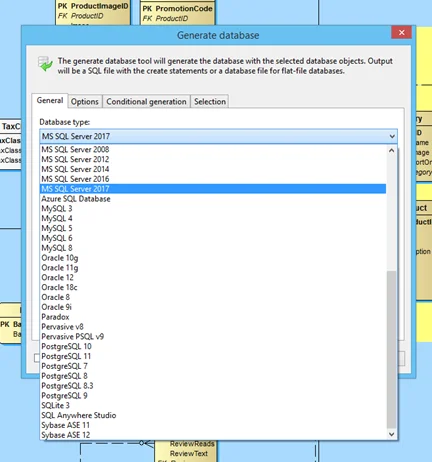
When you are done with your data model DeZign for Databases lets you create the database or export SQL scripts for database creation. When you have a database-independent model, you have to choose the target DBMS (database type) you want to use in the Generate database dialog.
You can also alter an existing database after comparing it to a database-independent model. In that case you choose the target DBMS when you connect to your target DBMS.
Mapping Portable Data Types
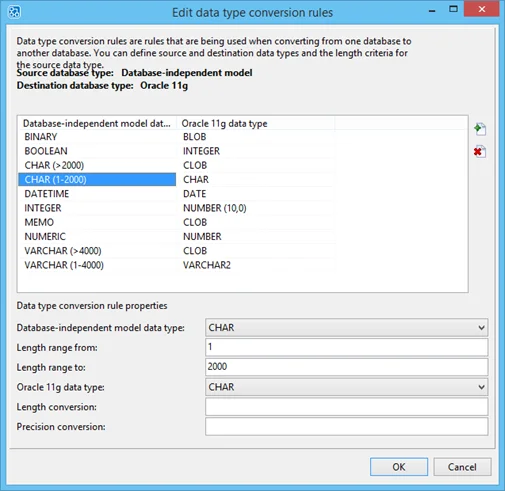
There are significant variations between the data types supported by different database products. When you have a database independent model, you work with a set of portable data types. These data types are very widely accepted data type names such as INTEGER, NUMERIC, or VARCHAR. These data types must be mapped to the correct target DBMS data type. The data type conversion rules are used for this conversion. You can modify the data type conversion rules in the Data type conversion rules editor when that's necessary.
DeZign for Databases will automatically convert your portable data types to the correct data types for the selected target DBMS when the database is generated.
Using Conditional Generation
Conditional generation (IFDEF...ENDIF) lets you generate selected parts of your data model. You can define the generation directive(s) that must be used for the model to database generation. This is very useful when you have a database independent model. With conditional generation you can use target DBMS specific code when that is necessary.
For example: Let's say you have a database-independent model that you want to forward engineer to MS SQL Server and Oracle. You can define triggers in a database independent model. Trigger code is database specific. You must have code that is only added to Oracle or MS SQL Server output. You can then use (user defined) generation directives such as "ORACLE" and "MSSQL" in your trigger code (see screenshot here below).
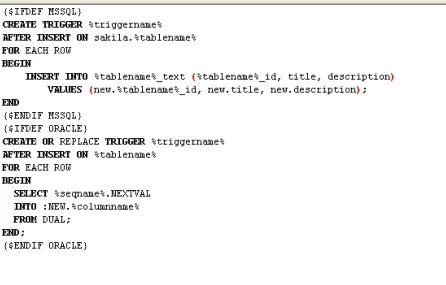
When you forward engineer or compare your model to a database you can define the generation directives you want to use for the model to database generation. You can define multiple generation directives.
Conditional generation is available in all the editions of DeZign for Databases.
Build your next data model with DeZign for Databases
available directly from Datanamic's download section
Try Out DeZign for Databases (14 days free trial)