
Generating and Maintaining Database Schemas
DeZign for Databases provides capabilities for forward engineering (generating databases), reverse engineering of existing databases and can keep your database and data model synchronized with its compare and synchronize functionality.
Reverse Engineering of Existing Databases
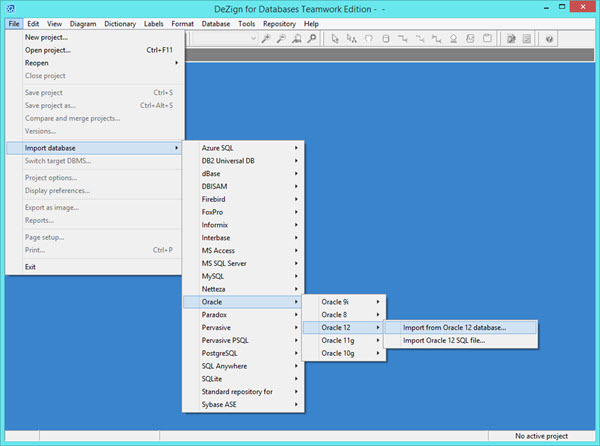
DeZign for Databases automates the process of reverse engineering a database. Reverse engineering is the process of generating a data model from an existing database schema. You can reverse engineer an existing database schema into a new data model or into an existing model. There are two ways to reverse engineer a model from a database schema. You can connect to the database directly or you can import an SQL script file. See the supported databases document for which databases a direct database connection is supported.
Generating Databases
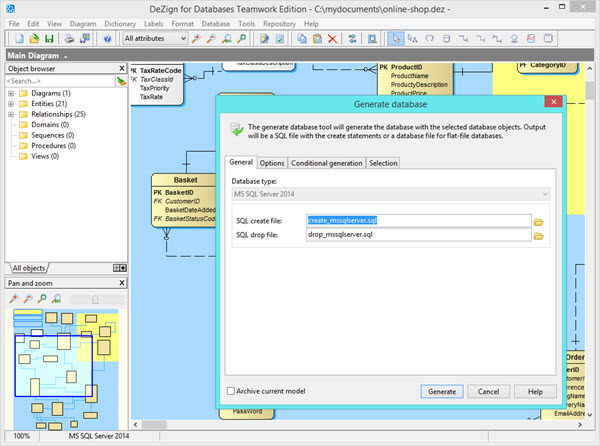
When you are done with your data model DeZign for Databases lets you create the database or export SQL scripts for database creation.
From the model's design, full definitions (as appropriate for the target database) are generated for all database objects such as tables, views, columns with defaults and domain constraints, primary keys, foreign keys, indexes, stored procedure, trigger code, sequences and other physical properties. For SQL databases such as Oracle, PostgreSQL, MySQL, MS SQL Server etc SQL scripts are generated. For desktop databases such as MS Access, dBase, Paradox etc the database files will be created.
Comparing and Synchronizing Database and Model
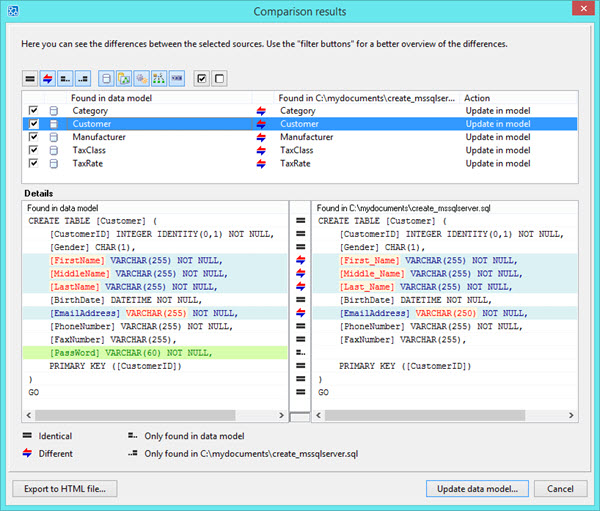
DeZign for databases offers compare and synchronize functionality for all synchronization use cases: model-to-database, model-to-script, database-to-model, script-to-model, model-to-model.
The tool loads your databases or SQL file or archived model and compares it with your data model, displays the differences and allows you to select which differences must be moved to the database or to the data model. When updating your data model, your model will be updated and the diagram layout will be preserved. When updating your databases, DeZign for Databases will generate a database update script (alter script) or implements the changes on the database directly.
Build your next data model with DeZign for Databases
available directly from Datanamic's download section
Try Out DeZign for Databases (14 days free trial)